Tag Archives: linux bluetooth

Lwm-Pulse arrives: First public version is out now.

Audio, Bluetooth, Ethernet and personal Wi-Fi in one Linux desktop panel.
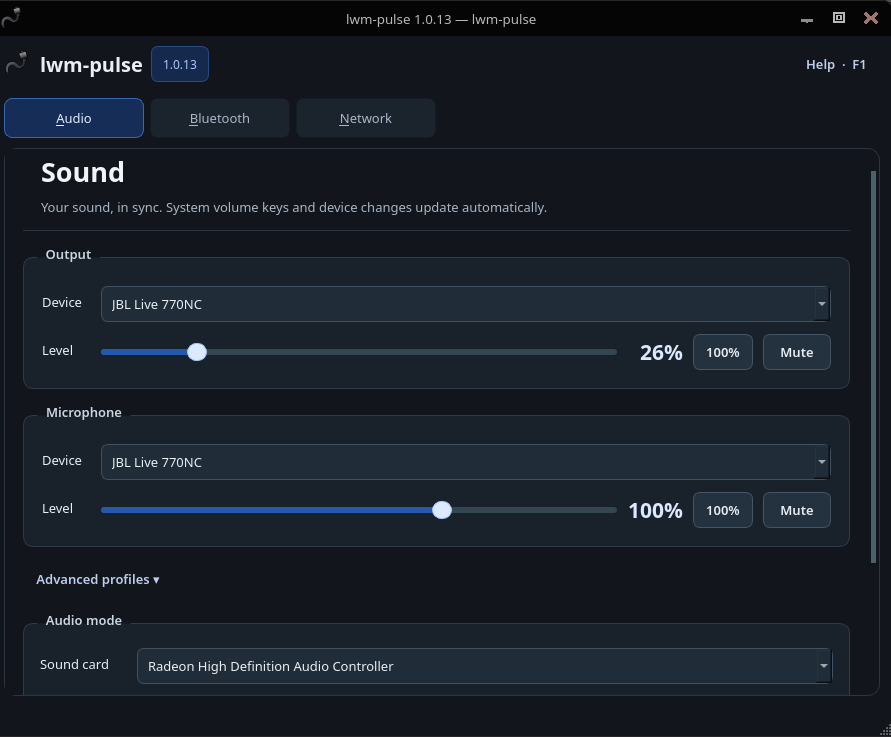
lwm-pulse brings everyday device controls together without running the desktop interface as root. Adjust sound, pair and connect Bluetooth devices, and manage standalone iwd networking from one place. Automatic connections prefer working Ethernet, then visible Wi-Fi with a saved password; a manual Wi-Fi choice is respected for the rest of the panel session.

Wi-Fi support: only WPA2-Personal (PSK) and WPA3-Personal (SAE) networks are supported, including compatible WPA2/WPA3-Personal transition-mode networks. WPA2/WPA3-Enterprise (802.1X/EAP), open/Enhanced Open (OWE), WEP and legacy WPA-only networks are outside this release’s supported Wi-Fi configurations. This restriction concerns Wi-Fi, not the panel’s Ethernet support.

Password storage: GNOME Keyring for future logins; the Linux kernel user keyring for temporary in-memory retention; or Do not remember for no new retained copy. GNOME Keyring is the only supported persistent provider.

Release: September 12, 2026 · License: GPL-3.0-only (see LICENSE). Author and maintainer: JJ Postitechtimejourney.net.

This is the first public release and may still contain errors. Review the installation and removal warnings before use. Report reproducible issues on the project’s GitHub issue tracker; feedback is welcome.

Source code and installation instructions are available at: https://github.com/postman721/Lwm-Pulse

Blue Pulse: A Volume Controller with Bluetooth Pairing Integration

Here comes a new program: Blue Pulse. It is a Python application that provides a graphical interface to control system volume, manage input/output audio devices, and pair/unpair Bluetooth devices on Linux systems. This application requires PipeWire.

Here is a screenshot

Bluetooth pairing linux: Blue Pulse

And here is the link to the project’s Github page: https://github.com/postman721/Blue_Pulse

Linux bluetooth connection setup from the system’s start

  1. Multichannel keyboard that needed a pin entered (Logitech K480).
  2. JBL Flip Essential 2 bluetooth speaker.

With the keyboard, scan and connect via cli:

bluetoothctl

From the [bluetooth], turn on power, turn on agent and start scanning for devices.

[bluetooth] power on
[bluetooth] agent on
[bluetooth] scan on

Next, pair your keyboard:

pair <mac_address_of_the_keyboard>

When you get prompted a code type it with the keyboard that you are pairing and press enter with it.

At this point, I got a pairing success message. This pairing process also worked with the Blueman applet. But for some reason it was not permanent with my Logitech K480 keyboard. When pairing was done via cli it was permanent and survived a computer reboot. I suspect this being because the gui never asked for any pin, whereas the cli did.

Finally from the cli, I connected my keyboard with:

connect <mac_address_of_the_keyboard>

In the end the cli process was so stable and nice, that I ended up pairing and connecting all my devices via it. Blueman that I had used previously, got removed.

When pairing and connecting was done, I needed to get my bluetooth devices connecting from the system’s startup(automatically). Here is a bash script together with a systemd file to accomplish that:

sudo nano /opt/bluetooth.sh

Script content example:

Continue reading