PostX Gnu/Linux 0.8 has been released. The distribution is based on Debian 11 and is amd64.
Disclaimer: You use PostX Gnu/Linux at your own responsibility. The author of techtimejourney.net (JJ Posti) or any other party is not responsible if any kind of damage or harm will occur . NO WARRANTY is given and the user therefore agrees to use this software at his/hers own risk.
AMD status on Debian 11: Things got a lot better with AMD graphics cards on Debian 11. However, some issues still persist with newer cards when booting into a freshly installed system. For example, the dm (Lightdm) might not show up or things might not function at all on xserver. If you are in any doubt when it comes to your graphics card´s functionality, use something like Virtualbox with extension packages to experience the system.
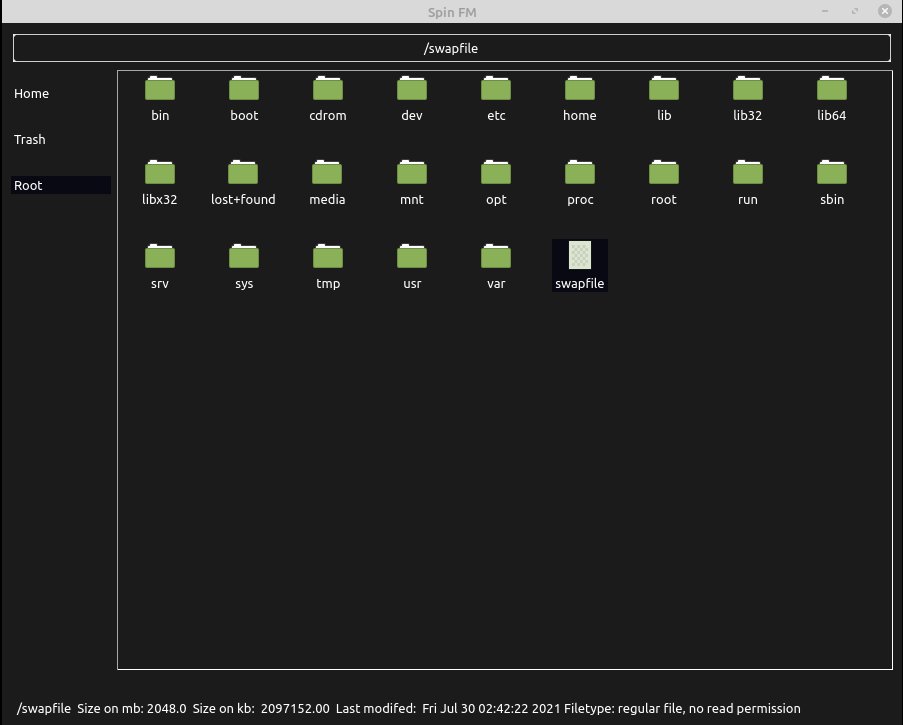
I have decided to delay PostX Gnu/Linux release to be at the end of December. It´s better to tune the features to their peak rather than do a too early release. The previous having said, there is a new filemanager coming soon. This will likely be the default on the upcoming distribution release. Here is a development screenshot.
Spin FM dev screenshot.
Still in development quality code of Spin FM will be released during the next weekend.
Copy and move made from right-click menu: Select entry or select entries by holding CTRL and clicking. Now, choose: “Select for copying or moving” from the right-click menu. Next, go to your location of choice and press either: “Copy to…” or “Move to…”
Copy and move functions read the location from addressbar to complete their actions.
Verification dialogs to “Copy to…” and “Move to…” : No final action should be performed without user’s acceptance.
Notice. If user cancels from any of the above dialogs then “Select for copying or moving” action needs to be redone.
Original entry from 11th of April:
7.0 RC2 fixes and new features:
CSS theme support.
4 themes added -> set your theme with theme.py.
Dual panel mode is now default.
Listview added as shortcut place.
File/object descriptors added.
Multi-selection by holding CTRL and clicking objects is now possible.
File-roller integration removed as an effort to reduce external dependencies -> Open external program functionality added as a replacement.
Object buffer of previous releases removed and replaced with native Pyqt5 dialogs.
The new default outlook is as below:
Additonal themes along with the source code is available at: