Category Archives: programs

Runner-Bar v.0.2-CSS is here

Runner-Bar v.0.1 was good but since I love styling I just made a new better release. Runner-Bar v.0.2  comes with a CSS support – now CSS actually handles all the styling. I also added tooltips, removed some obsoleted code and cleared some unneeded module importing while I was add it. I decided to keep the Runner-Bar v.0.1 page onboard as a reference.  You can find it here.

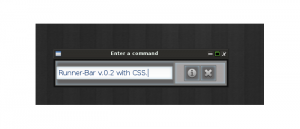
Also, a  “new release” of Power Manager 3 is now available. This bug fix release only fixes a minor spacing issue.Gentoo distribution complained about the spacing and did not want to start the program at all. On Debian base there was not even an error. Here is a screenshot from the new Runner-Bar. Now, the buttons will also highlight when you move mouse cursor on top of them.

linux programs, linux software, python programs, unix programs, unix software

Runner-Bar 0.2 with CSS.


runner-bar, techtimejourney programs, screenshots linux

About Runner-Bar.


If you do not want dark colors then check out the light theme for Runner-Bar

If you do not want dark colors then check out the light theme for Runner-Bar

Continue reading

Power-Manager 3 (QT4) released and a new Youtube video available

The latest addition to my programming portfolio: Power-Manager 3 is now here. Power-Manager 3 is a re-designed version of the older Power-Manager, which was originally put together with Zenity and Bash.

Power-Manager 3 does the same things as its older ancestor. As always, the screenshot speaks for itself:

linux screenshots, JJ Posti programs, linux applications

Power-Manager 3 with QT4

You will need python and python-qt4 in order to run this program. Remember to make it executable with chmod +x power.py

Run the program with python power.py

Remember to execute the above commands within a terminal client. You can also make a symbolic link – to achieve an easier startup.(For example, sudo ln -s power.py /usr/local/bin/power)

Download Power-manager from here: Power-Manager v.3.0.1

Old Versions: Power-Manager 3.zip

Enjoy and while I continue coding you can also go ahead and take a look at my latest Youtube video, which is about apt-get usage on Debian and its deriatives.

Added Note 4th  of August:

The program uses sudo. If you use the traditional root account instead then replace the program code’s  gksudo lines with gksu . Of course, make sure that you actually have gksudo or gksu installed on your system before using the program.

Calendar application (QT4) and a current time (Gtk) are here

Here are two applications I have recently made. The first one, PostX-Calendar is a QT application, which will certainly be featured in the future PostX Gnu/Linux 0.4 release coming in late 2016. The second one, is a basic time shower: “Current Time”, which does what is says and displays the current time.

time python, pygtk show time, pygtk clock, python clock, python show date

Current-Time

python calendar, linux calendar, calendar for linux, pyqt calendar

PostX-Calendar

Download Current-Time and PostX-Calendar combined zip archive file: Calendar_Time.zip

Continue reading

Python: “Cannot import module” issue and installing needed Python bits.

You have your Python program in front of you. You have already made it executable with chmod +x program.py and you are ready to run it. But, when you execute your program via terminal typing something like python program.py you will be greeted with an error message saying something similar to this:

“Cannot import module X, no such module.” Continue reading